
Xuda Dashboard Project Overview User Guide
Xuda Dashboard Project Overview User Guide
This guide explains the Overview tab inside a Xuda dashboard project.
Guide Purpose
Use this tab when you want the fastest summary of the project before you make a change, review activity, or hand the project to someone else.
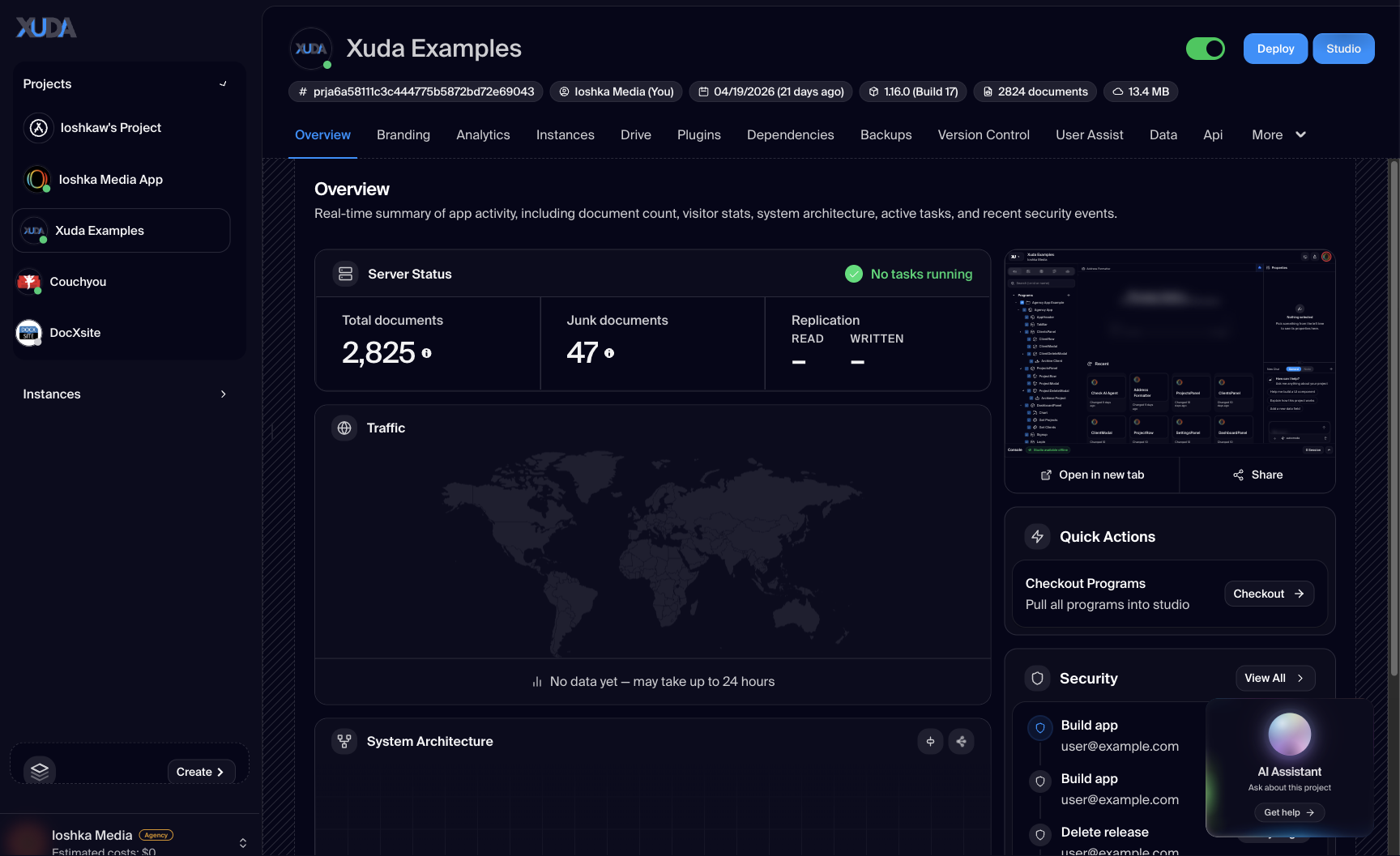
Step 1: Open The Overview Tab
Open your project in dev.xuda.ai/dashboard, then click Overview in the top project tab row.
This is usually the first tab you see when a project opens.
Step 2: Read The Main Summary Cards
The Overview tab is your health check. It usually shows:
- Server Status for the current project state
- document counts and storage-related totals
- a Traffic area for visitor activity
- System Architecture for the project structure
- a Preview card with options such as Open in new tab and Share
- Quick Actions for common project tasks
- a Security section with recent security-related events
Step 3: Use The Right-Side Action Cards
The right side of the page is where the project gives you quick next moves.
Common examples include:
- opening the live project preview
- sharing the project preview
- checking security items
- jumping into a quick action such as project checkout or a related workflow
What This Tab Is Best For
Use Overview when you want to answer simple questions quickly:
- Is the project active?
- Are there recent visitors?
- Are there recent security events?
- What is the fastest way to open or share this project?
If you are not sure where to begin, start here.